Can You Keep Notion Version History Forever?
Notion version history lasts 7 days on Free, 30 on Plus, 90 on Business, and forever only on Enterprise. Backup tools keep copies but often require restoring to view them. Here’s how local-first versioning makes “forever” actually usable.
Notion’s version history has an expiration date. On Free it’s 7 days, on Plus 30, on Business 90. Only Enterprise keeps it indefinitely. If you’ve ever needed a version from six months ago, you already know the answer to the question in the title: not with Notion’s built-in tools.
So the real question is: what do you use if you need version history to last forever?
What “forever” actually requires
Keeping version history forever means more than just not deleting it. It requires three things:
- Storage you control — not a retention window tied to a subscription tier.
- A copy that exists independently of Notion — so it survives plan changes, account issues, or leaving the platform.
- A way to actually use the history — because a version you can’t find or read is not much better than one that expired.
Most backup tools for Notion solve the first two. They capture snapshots on a schedule, store them locally or in cloud storage, and keep them as long as you configure. That’s a real improvement over Notion’s native retention. But they stop short of the third requirement in a way that matters more than it first appears.
Where most backup tools fall short
A typical Notion backup tool gives you a set of exported files — Markdown, HTML, or a database dump. You can keep them forever. But to see what a given version actually looked like, you usually have to restore it first — import it back into Notion, or open a raw export and try to reconstruct the page from its pieces.
That’s a workable archive, but it’s a poor versioning experience. If you want to compare two versions, you restore both. If you want to find which snapshot contains a specific paragraph, you open them one by one. The history exists, but it isn’t inspectable. You’re maintaining a stack of boxes in a warehouse, not browsing a version history.
What a versioning tool needs to do differently
If the goal is not just to keep versions forever but to use them, three capabilities separate a backup from a versioning tool:
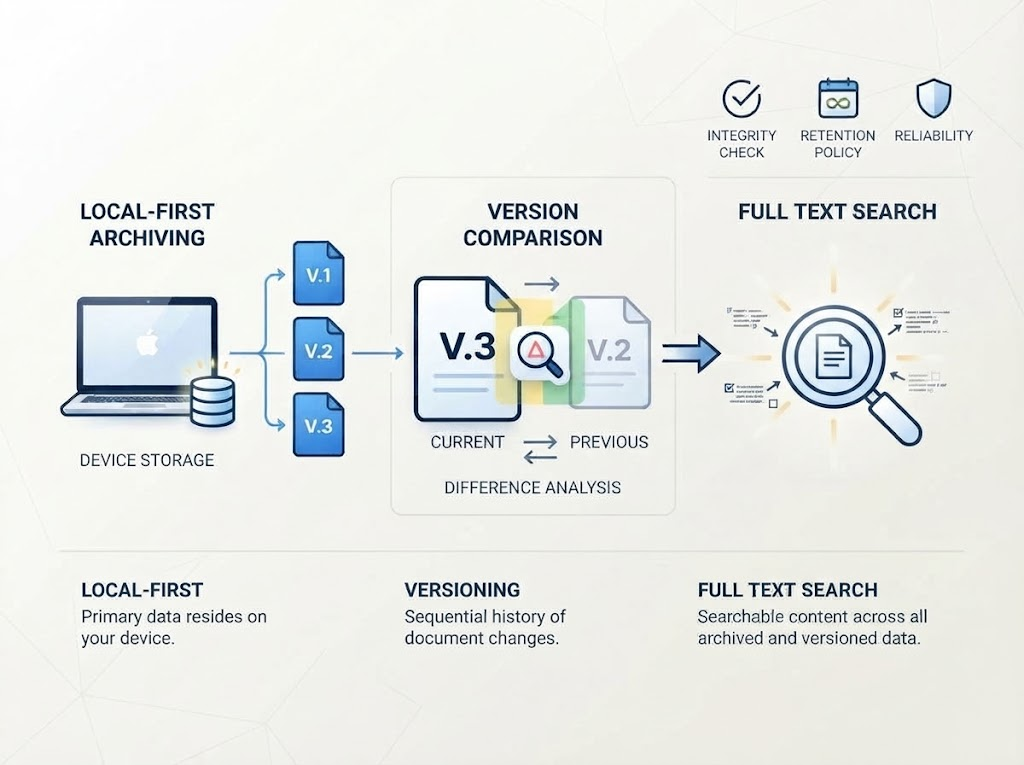
1. Native-like local browsing. You should be able to open a backup and read it the way you read Notion — pages, structure, content, all rendered naturally — without restoring it first. The archive should feel like Notion, offline.
2. Visual comparison across versions. You should be able to see what changed between two snapshots at a glance, rather than opening them side by side and scanning by eye. This is the difference between “I have the versions” and “I can see the difference.”
3. Full-text search across all versions. You should be able to search your entire backup history — not just the current version — and find the snapshot where a particular sentence, decision, or section appeared.
These are the capabilities that make version history usable rather than merely stored. And they’re the design center of NotionManager.
How NotionManager approaches it
NotionManager is a local-first backup and versioning tool for Notion. The “forever” part comes from storing backups on your own machine, so retention is limited by your disk, not your plan. The “versioning” part comes from how those backups are accessed:
- Notion-like local browsing — backups render in an interface close to Notion itself, so you can read an archived version without importing it back.
- Remote browsing — the same experience is available to someone on your network, so a reviewer can browse a backup without installing anything.
- Visual comparison — see differences between snapshots at a glance, instead of opening them one at a time.
- Full-text search — search across all local backups, so you can find the version that contains what you’re looking for.
The point isn’t just to keep versions forever. It’s to make “forever” actually useful — a history you can browse, compare, and search, not just a folder of exports waiting to be restored.
The bottom line
Notion’s native version history can’t last forever unless you’re on Enterprise. Backup tools can keep copies indefinitely, but most of them only let you view a version after restoring it. If you need version history that lasts and stays usable, you need a tool built around local-first storage and native-like browsing — not just snapshot capture.
NotionManager is built for exactly that gap.
Comments
No comments yet. Be the first to share your thoughts!
Leave a Reply
Your email address will not be published. Required fields are marked *